Procreate Wallpaper Texture Brushes: A Timeless Tool for Digital Artists
Why Procreate Wallpaper Texture Brushes Stand Out
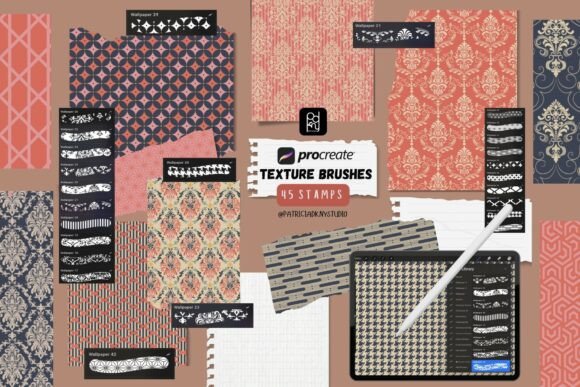
For digital artists and designers seeking to add depth, character, and a touch of vintage charm to their work, the Procreate Wallpaper Texture Brushes pack offers a powerful and efficient solution. This set of 45 seamless stamp brushes brings the elegance of classic wallpaper patterns into modern digital illustration, pattern design, and branding projects. Whether you're crafting social media visuals, printable papers, or wall art, these brushes allow you to apply rich textures in a single tap—no complex layering or manual tiling required.
What makes this brush pack especially appealing is its seamless integration into the Procreate app. Each brush is designed to fill large areas without distortion, making them ideal for both small-scale and expansive design work. However, as with any creative tool, understanding how to use them properly and avoiding common pitfalls can make all the difference in your final output.
Assuming All Texture Brushes Are Interchangeable
One of the most frequent misunderstandings is assuming that all texture brushes—whether from different creators or platforms—perform the same way. While many texture brushes exist, the Procreate Wallpaper Texture Brushes are specifically optimized for seamless tiling and ease of use within Procreate. Other brushes might leave visible seams, stretch awkwardly, or require manual adjustments.
Better approach: Always preview the brush in action before purchasing or downloading. Look for sample images that show the texture applied across a large area. Check if the edges truly blend without visible repetition or distortion.
Overlooking Compatibility and File Format
Some users mistakenly believe they can use these brushes outside of Procreate. Since the pack comes in .brushset format, it's only compatible with the Procreate app on iPad. Trying to use them in Photoshop or other graphic design software will not work.
Better approach: Confirm that you own an iPad and have the Procreate app installed before purchasing or downloading the brushes. If you primarily work in other software, look for texture tools specifically designed for those platforms.
Underestimating the Learning Curve
While these brushes are marketed as beginner-friendly, some users expect instant mastery. Simply tapping a brush doesn’t always yield the desired effect, especially when layering or adjusting scale and opacity. This can lead to frustration or a perception that the brushes aren’t worth the investment.
Better approach: Take time to experiment with brush settings like size, pressure, and blending modes. Watch tutorials or read documentation that comes with the brush pack. Understanding how each texture behaves in different contexts will improve your results significantly.
Misusing Brushes for the Wrong Projects
Another overlooked detail is knowing when not to use these brushes. While they're excellent for backgrounds, digital papers, and ornamental elements, they may not be suitable for detailed illustration or photo manipulation. Using them inappropriately can lead to cluttered or mismatched designs.
Better approach: Use these brushes to enhance, not dominate, your artwork. Consider the style of your project—vintage textures may not align with minimalist or modern themes. When in doubt, start with a subtle application and build up as needed.
What to Check Before You Buy or Use
Before downloading or purchasing the Procreate Wallpaper Texture Brushes, consider the following points to ensure they’ll meet your needs:
- Compatibility: Do you have a compatible iPad and the latest version of Procreate installed?
- Texture variety: Does the pack include a range of patterns that suit your artistic style and project type?
- Seamless quality: Are the textures truly seamless when tiled? Look for zoomed-in previews or test files if available.
- Usage rights: Is the brush set licensed for both personal and commercial use? Some creators restrict usage, which could affect your business projects.
- Support and documentation: Does the creator offer support or tutorials in case you run into issues?
Maximizing the Value of Your Texture Brushes
Once you’ve confirmed the brushes are a good fit for your workflow, here are some practical ways to get the most out of them:
- Layer with intention: Don’t just apply a texture on top and call it done. Experiment with blending modes like Multiply, Overlay, or Soft Light to integrate the texture more naturally into your artwork.
- Adjust scale and rotation: Many brushes look better when slightly scaled or rotated to avoid a repetitive look. Try varying the size depending on the area you’re covering.
- Combine with other brushes: Mix these texture brushes with hand-drawn elements or digital inks to create unique compositions that feel both vintage and modern.
- Use as a base for digital papers: Create your own printable papers by layering these textures over colored backgrounds. This is especially useful for scrapbooking, invitations, or branding kits.
Final Thoughts
The Procreate Wallpaper Texture Brushes offer a compelling way to bring timeless elegance and decorative flair into your digital creations. However, like any creative tool, their effectiveness depends heavily on how well you understand their strengths, limitations, and best practices. By avoiding common mistakes—like assuming universal compatibility or underestimating setup time—you can save hours of frustration and unlock the full potential of this versatile brush set.
Whether you're a beginner looking to enhance your first digital illustrations or a seasoned designer aiming to streamline your workflow, these brushes can be a valuable addition to your toolkit. Just remember to approach them with a bit of curiosity, patience, and a willingness to experiment.